SensorDeck: 隨時隨地監控您的 ThingSpeak 數據
SensorDeck: Monitor Your ThingSpeak Data Anywhere, Anytime
將您的物聯網數據放入口袋。SensorDeck 是您在 iPhone 和 iPad 上查看 ThingSpeak 頻道的最佳夥伴。
Put your IoT data in your pocket. SensorDeck is your best companion for viewing ThingSpeak channels on your iPhone and iPad.

核心功能 / Core Features
⭐ 直觀的儀表板
一目了然地查看您所有 ThingSpeak 頻道的最新數據。
⭐ Intuitive Dashboard
View the latest data from all your ThingSpeak channels at a glance.
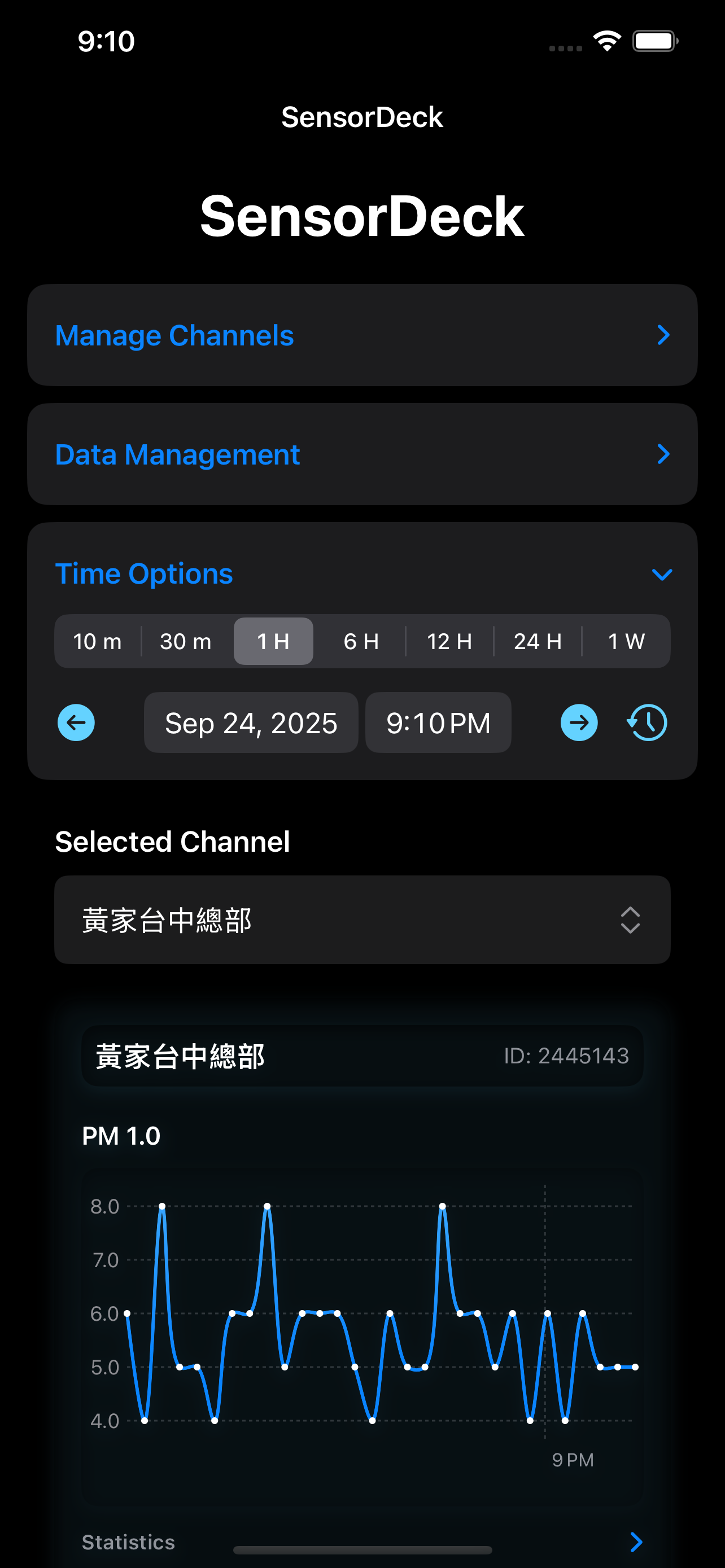
📊 互動式圖表
縮放、平移並檢視特定時間點的數據。我們為每個數據欄位提供清晰的視覺化圖表。
📊 Interactive Charts
Zoom, pan, and inspect data at specific points in time. We provide clear visualizations for each data field.
⌛ 彈性的時間區間
快速切換不同的時間範圍,從最近 10 分鐘到過去一週的數據都能輕鬆掌握。
⌛ Flexible Time Ranges
Quickly switch between different time frames, from the last 10 minutes to the past week, with ease.
📝 詳細數據統計
自動計算每個感測器在選定時間範圍內的最大值、最小值和平均值,幫助您快速洞察數據趨勢。
📝 Detailed Data Statistics
Automatically calculates the maximum, minimum, and average values for each sensor within the selected time range to help you quickly identify data trends.
🔑 多頻道支援
透過一次性購買解鎖進階版,即可新增並管理無限數量的頻道,並永久移除廣告。
🔑 Multi-Channel Support
Unlock the premium version with a one-time purchase to add and manage an unlimited number of channels and permanently remove ads.
💾 強大的資料管理
進階版使用者可以將數據快取至本機以供離線查看,並能將所有歷史數據匯出為 CSV 檔案,以便進行後續分析。
💾 Powerful Data Management
Premium users can cache data locally for offline viewing and export all historical data as a CSV file for further analysis.
立即下載,開始監控您的物聯網世界!
Download now and start monitoring your IoT world!
常見問題 / Frequently Asked Questions (FAQ)
- 在 App 主畫面的「管理頻道」區塊,點擊展開。
- 在「頻道 ID」欄位中輸入您的 ThingSpeak Channel ID。
- 如果您的頻道是私有的,請務必在「Read API Key」欄位中輸入對應的 API 金鑰。如果頻道是公開的,此欄位可留空。
- 點擊「新增頻道」按鈕。App 會自動抓取頻道的中繼資料並將其新增到您的儀表板。
- On the app's main screen, tap to expand the "Manage Channels" section.
- Enter your ThingSpeak Channel ID in the "Channel ID" field.
- If your channel is private, be sure to enter the corresponding API key in the "Read API Key" field. If the channel is public, this field can be left blank.
- Click the "Add Channel" button. The app will automatically fetch the channel's metadata and add it to your dashboard.
SensorDeck 的免費版本包含廣告,並限制使用者只能新增一個頻道。這是為了讓使用者可以充分體驗 App 的核心功能。若要新增多個頻道並移除廣告,您可以透過一次性購買來解鎖進階版功能。
The free version of SensorDeck includes ads and limits users to adding only one channel. This is to allow users to fully experience the app's core features. To add multiple channels and remove ads, you can unlock the premium features through a one-time purchase.
為了加快載入速度並節省您的網路流量,SensorDeck 會將您瀏覽過的數據暫時儲存在您的裝置上,這就是「快取」。一般情況下您不需要手動管理。但如果您懷疑數據沒有正確更新,或想釋放儲存空間,可以至「資料管理」區塊使用「清除快取」功能。請注意,這會刪除所有已下載的圖表數據,下次檢視時需要重新從網路下載。
To speed up loading times and save your network data, SensorDeck temporarily stores the data you've viewed on your device—this is the "cache." Normally, you don't need to manage it manually. However, if you suspect the data is not updating correctly or you want to free up storage space, you can use the "Clear Cache" function in the "Data Management" section. Please note that this will delete all downloaded chart data, which will need to be re-downloaded from the network the next time you view it.
可以!解鎖進階版功能後,您可以使用「匯出 CSV」功能。這會將您所有頻道中已快取的數據打包成一個 `.csv` 檔案,方便您在電腦上進行更深入的分析或備份。
Yes! After unlocking the premium features, you can use the "Export CSV" function. This will package the cached data from all your channels into a `.csv` file, making it convenient for you to perform more in-depth analysis or backups on your computer.
您可以修改頻道的 ID、API Key、以及在 App 內顯示的自訂「頻道名稱」和各個「欄位名稱」。這不會影響您在 ThingSpeak 網站上的原始設定,僅作為您在 App 中方便辨識的別名。
You can modify the channel's ID, API Key, and the custom "Channel Name" and individual "Field Names" displayed within the app. This does not affect your original settings on the ThingSpeak website; it only serves as an alias for easy identification within the app.
新增公開頻道非常簡單。您只需要在「頻道 ID」欄位輸入目標頻道的 ID,並將「Read API Key」欄位**完全留空**即可。例如,您可以嘗試新增 ThingSpeak 官方的氣象站範例,其頻道 ID 為 9。
Adding a public channel is very simple. You only need to enter the target channel's ID in the "Channel ID" field and leave the "Read API Key" field **completely blank**. For example, you can try adding ThingSpeak's official weather station example, which has a Channel ID of 9.